The Quavo & Takeoff Hotel Lobby trend
Make the Quavo AI Trend With Your Own Duo
Put you and your friend, partner, sibling — or your dog — in the orange booth from Quavo and Takeoff's Hotel Lobby performance. Two photos in, a 16-second 9:16 clip out, ready for TikTok in minutes.
From $9.99 · one-time payment · no account
Photos deleted after 30 days
Real output
What your video looks like
An unedited 16-second, 9:16 clip from the same generator you use above. The people in these samples are AI-generated; their moves follow the original performance.
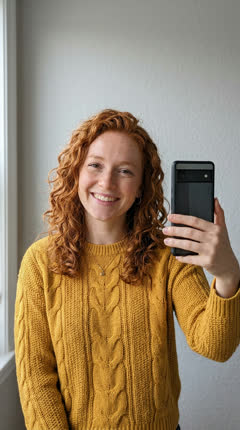
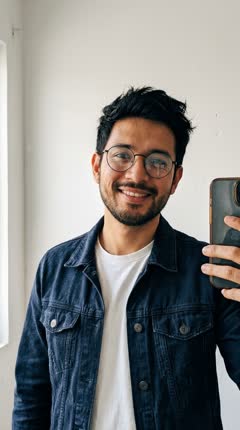 2 photos in
More real outputs
Unedited takes from the generator. Sample people are AI-generated.
Best friends
Two cats
The boys
How it works
- 01
Pick your duo
One photo of each of you: photo 1 stands on the left, photo 2 on the right. Swap sides before you generate if you change your mind.
- 02
Generate the booth take
You two take turns at the hanging mic in the orange booth. Usually ready in a few minutes; we email you when it is.
- 03
Add the sound and post
Download the MP4 (it's silent), add “original sound - COLORS” in TikTok from 0:00 and turn on the AI-generated label.
What is the Quavo AI trend?
The Quavo AI trend is the viral Hotel Lobby AI trend: two photos are turned into a two-person performance in the orange booth from Quavo and Takeoff's 2022 COLORS performance, with you and someone you choose in their places.
“Quavo AI” here doesn't mean an AI Quavo. It means the look of his performance with Takeoff — the bright orange booth and the single mic hanging between two people — with the two people swapped for whoever you choose.
The original: Quavo and Takeoff
In June 2022 Quavo and Takeoff performed “Hotel Lobby (Unc & Phew)” on A COLORS SHOW, as the duo Unc & Phew — uncle and nephew, since Quavo is Takeoff's uncle. Takeoff died in November 2022, which is why the clip means a lot to fans. When the AI version spread in September 2026, Quavo reposted the original performance, pointing people back to the real moment between the two of them.
Who people put in the booth
Best friends, couples, siblings, a parent and their kid, coworkers — and pets: either seat can be your dog or cat, or put two pets in together. The joke works because everyone who sees it knows both of you, so pick two clear photos of the people (or animal) your followers will recognize instantly.
First time? Follow the step-by-step guide, or see all the names people use for this trend.
Sources: Quavo & Takeoff – “Hotel Lobby” | A COLORS SHOW (official, YouTube) · Wikipedia – Unc & Phew · The Source – Quavo reposts the original (Sept 2026)
Updated .
Photo tips
The booth, light and mic never change, so the photos decide how much it looks like you. A close, front-facing photo of each person beats a wide shot of you both.
Works best
- One person per photo
- Face clearly visible, roughly facing the camera
- Good, even light
- Waist-up framing works best
Avoid
- Sunglasses or face covered
- Heavy filters
- Group photos
- Tiny or blurry faces
FAQ
What is the Quavo AI trend?
+
The Quavo AI trend is the viral Hotel Lobby AI trend: two photos are turned into a two-person performance in the orange booth from Quavo and Takeoff's 2022 COLORS performance, with you and someone you choose in their places.
Is the Quavo AI trend the same as Hotel Lobby AI and Migos AI?
+
Yes. Quavo AI, Hotel Lobby AI, Migos AI and the Unc & Phew trend are names for the same video: two people performing side by side in an orange booth with one hanging microphone. People name it after whichever part of the original they remember.
Does the video use Quavo's or Takeoff's face or voice?
+
No. Your video only contains the two people from your photos, in a newly generated booth — no footage, face or voice of Quavo or Takeoff. Their moves follow the original choreography so the trend sound lines up. If you're looking for a Quavo AI voice generator, this isn't one.
Can I make a Quavo AI video with my friend?
+
Yes — that's the whole trend. Upload one photo of you and one of your friend at the top of this page, tap Generate and download the 16-second clip when it's ready.
Can I make one with my dog or cat?
+
Yes — either seat can be a pet, or both. Put your pet in photo 2 and it stands up at full height next to you and does the big moves; in photo 1 it stays closer to its real size and jumps up to the mic with you. Two pets both stand up and perform. We've tested two cats and a person with their dog in each seat; every pet kept its own markings and side, and the dog kept its collar. A clear, front-facing photo where the face is well lit works best. If a generation fails, its video credit comes back automatically.
What photos work best?
+
One person per photo, face clearly visible and roughly facing the camera, in good light. Waist-up selfies are ideal. Avoid sunglasses, heavy filters, group photos and tiny faces.
How long does it take?
+
Usually ready in a few minutes. You can close this page — we'll email you when it's ready.
Does the video include the Hotel Lobby song?
+
No — it isn't Quavo's voice and the download is silent. Your clip is silent on purpose: the two of you perform Quavo and Takeoff's moves from the COLORS performance, timed so TikTok's “original sound - COLORS” lines up from 0:00 — moves and lip sync included. Adding the sound inside TikTok links your video to the trend and avoids copyright blocks.
Is this an official Quavo AI generator?
+
No. Make Hotel Lobby is an independent tool, not affiliated with or endorsed by Quavo, Takeoff's estate, Migos, COLORS, TikTok or Instagram. Only use photos you have permission to use.